
Chrome Mask by skyschub
Makes Firefox wear a mask to look like Chrome to websites that block Firefox otherwise.
Available on Firefox for Android™Available on Firefox for Android™
59,942 Users59,942 Users
Scan the QR code to open this extension in Firefox for Android

Extension Metadata
Screenshots
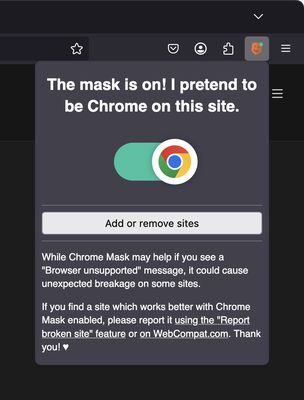
About this extension
A little Firefox Extension that provides a one-click toggle to spoof as Chrome in Firefox - or, in other words, to put on the Chrome Mask. It is meant to be used sites that show a "Your browser is unsupported" warning and nowhere else. This means that:
There are a lot of generic "User Agent spoof" extensions. However, this extension does a few things differently:
- Chrome Mask is not a privacy tool. It does not make you look like Chrome to fingerprinters, it does not reduce your privacy footprint; in fact, it makes it worse.
- Chrome Mask is not a tool to make YouTube faster. It does not. The only thing it does is clear your cache, which might make things faster, but you can do that yourself. Do not use Chrome Mask, or any other User Agent spoofing extension, on YouTube, because it will break things.
- Chrome Mask is not a guarantee that a site will work. There are lots of reasons why sites might not work in Firefox, and Chrome Mask is not, and will never try to be, a fix for all of them, because that's impossible.
There are a lot of generic "User Agent spoof" extensions. However, this extension does a few things differently:
- Instead of overriding the User Agent string on all sites, this extension allows you to only look like Chrome on specific sites.
- Unlike some extensions with outdated version numbers and UA strings, this extension automatically updates the Chrome version it pretends to be. It does that by querying a simple API every 24 hours.
- You don't have to pick the correct Operating System manually; this extension does it for you.
- This extension also shims a few additional JavaScript attributes, like
navigator.vendoror the globalchromeobject, to pass common browser checks. Starting with Version 9, the extension also shims some basic Client Hints data: thenavigator.userAgentData.{brands,mobile,platform}properties; plus thesec-ch-ua,sec-ch-ua-mobile, andsec-ch-ua-mobileheaders.
Rated 4.3 by 175 reviewers
Permissions and data
Required permissions:
- Access browser tabs
- Access your data for all websites
Data collection:
- The developer says this extension doesn't require data collection.
More information
- Add-on Links
- Version
- 11.0.0
- Size
- 63.3 KB
- Last updated
- 17 days ago (Nov 9, 2026)
- Related Categories
- License
- MIT License
- Privacy Policy
- Read the privacy policy for this add-on
- Version History
- Add to collection