Firefox Browser Add-ons
  • Extensions
  • Themes
    • for Firefox
    • Dictionaries & Language Packs
    • Other Browser Sites
    • Add-ons for Android
Log in
Preview of Grandstream GRP Click2Dial

Grandstream GRP Click2Dial by grandstream

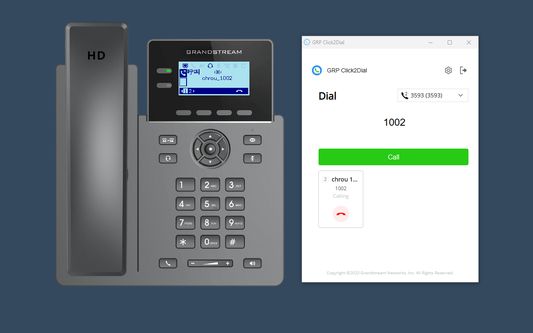
Grandstream GRP Click2Dial is a lightweight browser extension that seamlessly integrates with Grandstream GRP260x series and GRP260x Lite devices, enabling one-click dialing, screen sharing, software annotation, and file transfer from a computer.

0 (0 reviews)0 (0 reviews)
171 Users171 Users
Download Firefox and get the extension
Download file

Extension Metadata

Screenshots
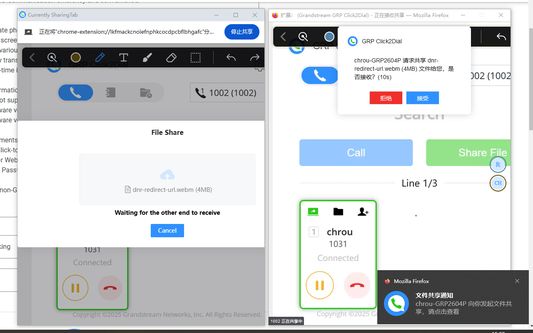
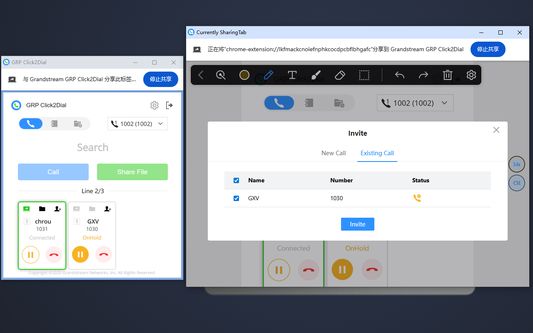
make callshare screenshare fileinvite memberdraw notes
About this extension
Grandstream GRP Click2Dial is a lightweight web browser extension that seamlessly integrates with Grandstream GRP260x series and GRP260x Lite devices. It allows users to log in via device IP or MAC address, enabling one-click dialing, screen sharing, software annotation, and file transfer directly from their computers. This plugin reduces manual operations on physical phones, significantly enhancing communication efficiency and convenience.

Key Features:
1. Directly initiate phone calls by selecting contact-related strings on webpages within the browser.
2. Easily share screens during calls for remote presentations or collaboration.
3. Annotate in various styles during screen sharing.
4. Conveniently transfer files during calls to improve communication efficiency.
5. Receive real-time incoming call notifications on the computer for prompt handling.

Important Information:
- GRP260x firmware versions prior to 1.0.5.25 are not supported.
- GRP260x firmware versions 1.0.5.25 through 1.0.7.5 support only basic dialing functionality.
- GRP260x firmware versions 1.0.7.33 and later support the full range of sharing features.
- GRP260x Lite firmware versions 1.0.1.x and later are supported.

Requirements and Notes
  1. Set “Web Access Mode” to “HTTP” or “Both HTTP and HTTPS”.
  2. Enable “Click-To-Dial Feature”.
  3. Enable “Enable User Web Access”.
  4. Logging in with the default password is not supported.
  5. This plugin supports GRP260x and GRP260x Lite series phones only. Other phone models cannot log in to the plugin.
  6. Only one plugin can be logged in on each device at a time. Simultaneous login to multiple plugins is not supported.
  7. Direct IP calling is supported. Enable “Enable Direct IP Call” before using this feature.
Rated 0 by 0 reviewers
Log in to rate this extension
There are no ratings yet

Star rating saved

5
0
4
0
3
0
2
0
1
0
No reviews yet
Permissions and data

Required permissions:

  • Display notifications to you
  • Access browser tabs
  • Access your data for all websites

Optional permissions:

  • Access your data for all websites
Learn more
More information
Add-on Links
  • Copy add-on ID
Version
1.0.3.11
Size
705.69 KB
Last updated
2 days ago (Aug 24, 2026)
Related Categories
  • Social & Communication
License
All Rights Reserved
Version History
  • See all versions
Add to collection
Report this add-on
Go to Mozilla's homepage

Add-ons

  • About
  • Firefox Add-ons Blog
  • Extension Workshop
  • Developer Hub
  • Developer Policies
  • Community Blog
  • Forum
  • Report a bug
  • Review Guide

Download

  • Download Firefox
  • Windows
  • macOS
  • iOS
  • Android
  • Linux
  • All

Latest Builds

  • Nightly
  • Beta

Firefox for Business

  • Enterprise

Community

  • Connect
  • Contribute
  • Developer

Follow

  • Instagram
  • YouTube
  • TikTok
  • Bluesky
  • Podcast
  • Privacy
  • Cookies
  • Legal

Except where otherwise noted, content on this site is licensed under the Creative Commons Attribution Share-Alike License v3.0 or any later version.