
NetSuite Record Scripts by Alien Technology
NetSuite Record Scripts – View Scripts & Workflows Instantly
34 Users34 Users
Extension Metadata
Screenshots
About this extension
NetSuite Record Scripts is a productivity-boosting browser extension designed for NetSuite administrators, developers, and power users. It lets you instantly see all deployed scripts and associated workflows on any record you're viewing in NetSuite. No more digging through script deployments or the workflow manager. Open any record, click the icon, and get a clean, organized breakdown of everything running on that page.
✅ Key Features:
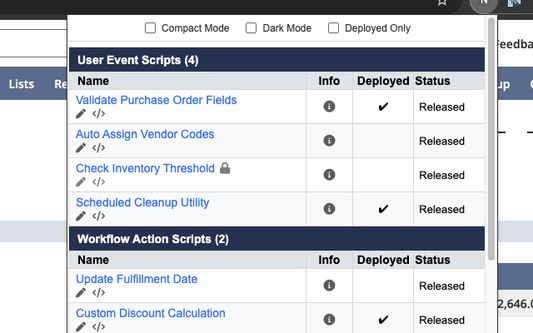
🔍 Auto-detect record type · Reads the record type from the page and dynamically retrieves all relevant SuiteScript deployments and workflows. Works on standard records, custom records, and custom transactions.
🧠 Dual API support · Uses SuiteScript 2.x (N/query, N/search, N/currentRecord) as the primary engine, with automatic SuiteScript 1.0 fallback for pages where 2.x modules aren't available. Maximum compatibility across all NetSuite pages.
⚡ On-demand execution · Scripts only run when you click the extension icon, not on every page load. Zero impact on your daily NetSuite browsing and no wasted governance.
🔘 Smart icon · The extension icon is only active on NetSuite pages. It grays out automatically on non-NetSuite sites.
↕️ Sort · Sort scripts alphabetically (A→Z or Z→A) within their type groups.
🔀 Drag-and-drop group ordering · Arrange script type groups in your preferred priority (e.g., User Events first, then Client Scripts, then Workflows). Your order is saved automatically.
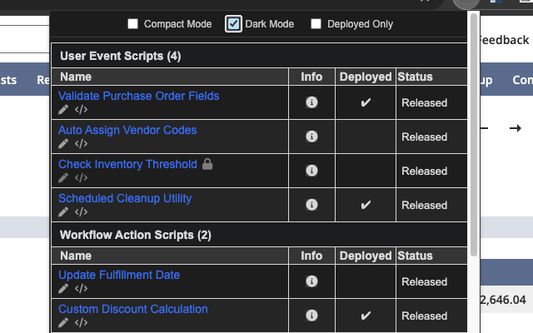
🌙 Dark / Light mode · Choose between clean light or sleek dark appearance.
🧩 Compact mode · Condensed view with smaller font and spacing.
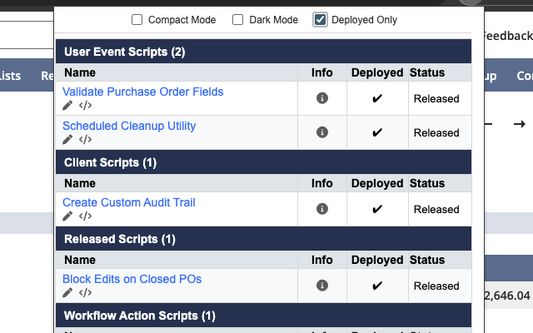
🛠️ Deployed-only filter · Show only deployed scripts and released workflows to keep your view clean and relevant.
🔄 Refresh · Force a fresh data fetch at any time with one click.
📋 Script Details at a Glance:
• Script Name (clickable link to the script record)
• Script Type (User Event, Client, Mass Update, Workflow Action, etc.)
• Deployment Status (Deployed ✔ / Not Deployed)
• Current Status (Released, Testing, etc.)
• Script File Name, API Version, and Description (hover the info icon)
📋 Workflow Details:
• Workflow Name (clickable link to the workflow definition)
• Release Status (Released ✔, Testing, Not Initiating, Suspended)
• Description (hover the info icon)
⚙️ One-Click Access:
• Open script records directly in NetSuite
• Edit script record
• Edit script source code
• Open workflow definitions in view or edit mode, all in a new tab
🧠 How It Works:
• Step 1: Navigate to any record page in NetSuite.
• Step 2: Click the NetSuite Record Scripts icon (it lights up on NetSuite pages).
• Step 3: View grouped sections for Script Deployments (grouped by type) and Workflows.
• Step 4: Click on any name to navigate to the script record. Use the pencil icon for edit mode, or the code icon for the source file.
• Step 5: Hover the info icon for API Version, Description, and File Name.
• Step 6: Use the toolbar to toggle Dark Mode, Compact View, Deployed Only, Sort order, and Group arrangement.
All data is retrieved live from the page context via NetSuite's native APIs. No external data collection, no login prompts, no storage of sensitive info.
🔒 Privacy & Security:
This extension is fully open source — anyone can audit the code and verify its behavior. In response to Oracle's security notification regarding Chrome extensions (https://community.oracle.com/netsuite/english/discussion/4512418/security-notification-chrome-extensions), this extension has been made open source to ensure full transparency.
📂 Source Code: https://github.com/alien4u/ns-record-scripts
🌐 Compatibility: Chrome, Edge, Firefox (Manifest V3, 109+), and Safari (via Web Extension wrapper).
Changelog (v2.0.7)
🔐 Permission Changes
• Removed tabs permission: The extension no longer requests the "tabs" permission, eliminating the "Read your browsing history" warning. Icon activation now works
without it.
✨ New Features
• Popup header: The popup now displays a branded "NetSuite Record Scripts" header bar with dark-mode support.
• Firefox support: Full Firefox compatibility with a dedicated manifest. Available on Firefox Add-ons.
🛡️Security & Privacy
• innerHTML replaced with DOM APIs: All dynamic HTML generation now uses safe DOM element creation methods (createElement, textContent, appendChild) instead of
innerHTML. Meets Firefox store validation requirements and eliminates XSS vectors.
• Privacy policy added: Comprehensive PRIVACY.md documenting zero data collection, no external servers, no analytics or telemetry.
🔧 Technical
• Split manifest architecture: Separate manifest_firefox.json for Firefox-specific configuration (service_worker + scripts fallback, browser_specific_settings).
• Version bump: 2.0.5 → 2.0.7.
✅ Key Features:
🔍 Auto-detect record type · Reads the record type from the page and dynamically retrieves all relevant SuiteScript deployments and workflows. Works on standard records, custom records, and custom transactions.
🧠 Dual API support · Uses SuiteScript 2.x (N/query, N/search, N/currentRecord) as the primary engine, with automatic SuiteScript 1.0 fallback for pages where 2.x modules aren't available. Maximum compatibility across all NetSuite pages.
⚡ On-demand execution · Scripts only run when you click the extension icon, not on every page load. Zero impact on your daily NetSuite browsing and no wasted governance.
🔘 Smart icon · The extension icon is only active on NetSuite pages. It grays out automatically on non-NetSuite sites.
↕️ Sort · Sort scripts alphabetically (A→Z or Z→A) within their type groups.
🔀 Drag-and-drop group ordering · Arrange script type groups in your preferred priority (e.g., User Events first, then Client Scripts, then Workflows). Your order is saved automatically.
🌙 Dark / Light mode · Choose between clean light or sleek dark appearance.
🧩 Compact mode · Condensed view with smaller font and spacing.
🛠️ Deployed-only filter · Show only deployed scripts and released workflows to keep your view clean and relevant.
🔄 Refresh · Force a fresh data fetch at any time with one click.
📋 Script Details at a Glance:
• Script Name (clickable link to the script record)
• Script Type (User Event, Client, Mass Update, Workflow Action, etc.)
• Deployment Status (Deployed ✔ / Not Deployed)
• Current Status (Released, Testing, etc.)
• Script File Name, API Version, and Description (hover the info icon)
📋 Workflow Details:
• Workflow Name (clickable link to the workflow definition)
• Release Status (Released ✔, Testing, Not Initiating, Suspended)
• Description (hover the info icon)
⚙️ One-Click Access:
• Open script records directly in NetSuite
• Edit script record
• Edit script source code
• Open workflow definitions in view or edit mode, all in a new tab
🧠 How It Works:
• Step 1: Navigate to any record page in NetSuite.
• Step 2: Click the NetSuite Record Scripts icon (it lights up on NetSuite pages).
• Step 3: View grouped sections for Script Deployments (grouped by type) and Workflows.
• Step 4: Click on any name to navigate to the script record. Use the pencil icon for edit mode, or the code icon for the source file.
• Step 5: Hover the info icon for API Version, Description, and File Name.
• Step 6: Use the toolbar to toggle Dark Mode, Compact View, Deployed Only, Sort order, and Group arrangement.
All data is retrieved live from the page context via NetSuite's native APIs. No external data collection, no login prompts, no storage of sensitive info.
🔒 Privacy & Security:
This extension is fully open source — anyone can audit the code and verify its behavior. In response to Oracle's security notification regarding Chrome extensions (https://community.oracle.com/netsuite/english/discussion/4512418/security-notification-chrome-extensions), this extension has been made open source to ensure full transparency.
📂 Source Code: https://github.com/alien4u/ns-record-scripts
🌐 Compatibility: Chrome, Edge, Firefox (Manifest V3, 109+), and Safari (via Web Extension wrapper).
Changelog (v2.0.7)
🔐 Permission Changes
• Removed tabs permission: The extension no longer requests the "tabs" permission, eliminating the "Read your browsing history" warning. Icon activation now works
without it.
✨ New Features
• Popup header: The popup now displays a branded "NetSuite Record Scripts" header bar with dark-mode support.
• Firefox support: Full Firefox compatibility with a dedicated manifest. Available on Firefox Add-ons.
🛡️Security & Privacy
• innerHTML replaced with DOM APIs: All dynamic HTML generation now uses safe DOM element creation methods (createElement, textContent, appendChild) instead of
innerHTML. Meets Firefox store validation requirements and eliminates XSS vectors.
• Privacy policy added: Comprehensive PRIVACY.md documenting zero data collection, no external servers, no analytics or telemetry.
🔧 Technical
• Split manifest architecture: Separate manifest_firefox.json for Firefox-specific configuration (service_worker + scripts fallback, browser_specific_settings).
• Version bump: 2.0.5 → 2.0.7.
Rated 2.3 by 3 reviewers
Permissions and data
Optional permissions:
- Access your data for sites in the netsuite.com domain
Data collection:
- The developer says this extension doesn't require data collection.
More information
- Add-on Links
- Version
- 2.0.7
- Size
- 51.74 KB
- Last updated
- a day ago (Feb 11, 2026)
- Related Categories
- License
- MIT License
- Privacy Policy
- Read the privacy policy for this add-on
- Version History
- Tags
- Add to collection