
Notion Boost by Gourav Goyal
Boost Notion productivity with 20+ tweaks: a sticky outline (table of contents), full width and small text by default, a scroll-to-top button, hide the AI button, comments and backlinks, and more.
667 Users667 Users
Extension Metadata
Screenshots

About this extension
Make Notion more productive and less distracting. Notion Boost is a lightweight extension that adds 20+ features and tweaks to Notion. Turn each one on or off from its popup:
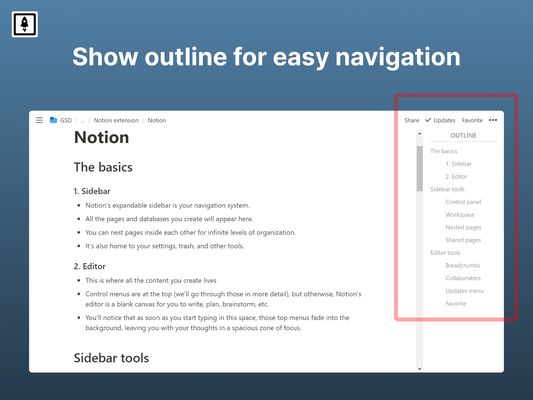
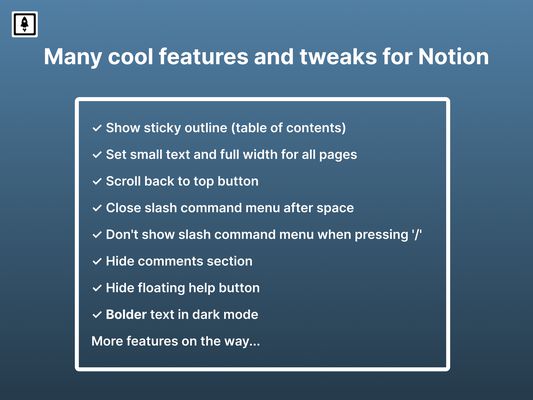
✔ Show a sticky outline (table of contents) of every heading on the page, even on long pages.
✔ Set full width for all pages by default.
✔ Set small text for all pages by default.
✔ Add a 'Scroll to top' button.
✔ Hide Notion's own table of contents.
✔ Hide the floating AI button.
✔ Don't show the AI menu when pressing space.
✔ Close the slash command menu '/' by pressing space.
✔ Don't show the slash command menu when pressing '/'.
✔ Hide the placeholder "Press '/' for commands".
✔ Show full text in table cells on mouse hover.
✔ Open full pages instead of previews.
✔ Align images and videos to the left instead of center.
✔ Add a frame around images.
✔ Add more height to pages by hiding the top padding, cover image and icon.
✔ Show line numbers in code blocks.
✔ Enable spellcheck inside code blocks.
✔ Don't show the popup menu when pasting external links.
✔ Hide the red notification icon in the sidebar.
✔ Make bold text bolder in dark mode.
✔ Truly hide 'Hidden columns' in Kanban board view.
✔ Hide the comments section on all pages.
✔ Hide the backlinks section on all pages.
✔ Narrow the spacing between list items.
✔ Add indentation lines to lists.
🏠 Homepage: https://gourav.io/notion-boost
✅ All features in detail: https://gourav.io/notion-boost#-currently-added-features
🙏 If you find Notion Boost useful, please rate it ★★★★★.
❤ You can also support its development: https://ko-fi.com/gorvgoyl
Notion Boost is also available for Chrome, Edge and Brave.
HOW IT WORKS
WHO MADE THIS?
Notion Boost is made by Gourav Goyal (https://gourav.io). I'm a tech founder and productivity freak who relies heavily on Notion to organize things and manage work. I made this extension to make Notion more productive (and less distracting) by filling the gaps I feel the product has. I hope you find it helpful :)
PRIVACY POLICY
Notion Boost is open source and has no ads, no analytics and no trackers. It doesn't store or send any data from your Notion account: the outline reads the open page's headings from Notion itself, inside your browser.
SUPPORT
Found a bug or have an idea? Open an issue: https://github.com/GorvGoyl/Notion-Boost-browser-extension/issues
✔ Show a sticky outline (table of contents) of every heading on the page, even on long pages.
✔ Set full width for all pages by default.
✔ Set small text for all pages by default.
✔ Add a 'Scroll to top' button.
✔ Hide Notion's own table of contents.
✔ Hide the floating AI button.
✔ Don't show the AI menu when pressing space.
✔ Close the slash command menu '/' by pressing space.
✔ Don't show the slash command menu when pressing '/'.
✔ Hide the placeholder "Press '/' for commands".
✔ Show full text in table cells on mouse hover.
✔ Open full pages instead of previews.
✔ Align images and videos to the left instead of center.
✔ Add a frame around images.
✔ Add more height to pages by hiding the top padding, cover image and icon.
✔ Show line numbers in code blocks.
✔ Enable spellcheck inside code blocks.
✔ Don't show the popup menu when pasting external links.
✔ Hide the red notification icon in the sidebar.
✔ Make bold text bolder in dark mode.
✔ Truly hide 'Hidden columns' in Kanban board view.
✔ Hide the comments section on all pages.
✔ Hide the backlinks section on all pages.
✔ Narrow the spacing between list items.
✔ Add indentation lines to lists.
🏠 Homepage: https://gourav.io/notion-boost
✅ All features in detail: https://gourav.io/notion-boost#-currently-added-features
🙏 If you find Notion Boost useful, please rate it ★★★★★.
❤ You can also support its development: https://ko-fi.com/gorvgoyl
Notion Boost is also available for Chrome, Edge and Brave.
HOW IT WORKS
- Open any Notion page: notion.so, notion.com or a public notion.site page.
- Click the Notion Boost icon in your browser's toolbar.
- Turn features on or off in the popup. They apply right away.
WHO MADE THIS?
Notion Boost is made by Gourav Goyal (https://gourav.io). I'm a tech founder and productivity freak who relies heavily on Notion to organize things and manage work. I made this extension to make Notion more productive (and less distracting) by filling the gaps I feel the product has. I hope you find it helpful :)
PRIVACY POLICY
Notion Boost is open source and has no ads, no analytics and no trackers. It doesn't store or send any data from your Notion account: the outline reads the open page's headings from Notion itself, inside your browser.
SUPPORT
Found a bug or have an idea? Open an issue: https://github.com/GorvGoyl/Notion-Boost-browser-extension/issues
Rated 4.9 by 22 reviewers
Permissions and data
Required permissions:
- Access your data for sites in the notion.com domain
- Access your data for sites in the notion.site domain
- Access your data for sites in the notion.so domain
Optional permissions:
- Access your data for sites in the notion.so domain
- Access your data for sites in the notion.site domain
- Access your data for sites in the notion.com domain
Data collection:
- The developer says this extension doesn't require data collection.
More information
- Add-on Links
- Version
- 3.3.9
- Size
- 116.61 KB
- Last updated
- 2 days ago (Oct 29, 2026)
- Related Categories
- Version History
- Add to collection
The developer of this extension asks that you help support its continued development by making a small contribution.