
Volume Control [Boost volume] by Chaython
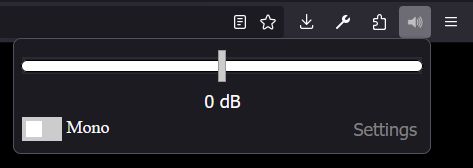
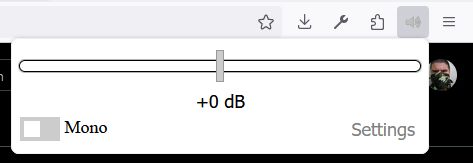
Boost, or lower your volume up to or down 32 DB. Auto Volume normalization. Mono correction.
79,373 Users79,373 Users
Extension Metadata
Screenshots
About this extension
Volume Control – Volume Booster for Firefox
Control the volume of individual websites, boost quiet audio, reduce loud media, and customize your listening experience in Firefox.
FEATURES
PERMISSIONS EXPLAINED
Volume Control requests permissions to provide its audio controls across websites. Here's why they are needed.
Access your data for all websites
Volume Control needs access to websites to detect supported audio and video, adjust playback volume, and apply supported audio-processing features.
This permission is broad because the extension is designed to work on whichever website you choose, rather than only a predefined list.
Storage
Saves your preferences, including supported site-specific volume settings and audio options, so they persist between visits and browser sessions.
Access the current tab
Allows the extension to interact with the current tab when you invoke it, such as when opening its toolbar popup or using its extension action.
Local-file access
To use Volume Control on local audio or video files, you may need to enable Allow access to file URLs in Firefox's extension settings. Support depends on the media and playback method.
IMPORTANT LIMITATIONS
Volume Control cannot control every type of audio in Firefox. Available features depend on how a website plays media and which browser audio capabilities are accessible.
If a feature does not work on a particular website, the cause may be the site's player implementation or a browser security restriction rather than an extension setting.
KEYBOARD SHORTCUTS
Shortcuts can be customized through Firefox's Manage Extension Shortcuts settings.
COMPATIBILITY
Volume Control adjusts supported media playback. It does not control arbitrary application audio, bypass DRM, or override browser security restrictions.
NEED HELP OR FOUND A PROBLEM?
If something isn't working as expected, a feature isn't supported on a particular website, or you have a suggestion, please open an issue on GitHub before leaving a review.
Bug reports and feedback help investigate problems, improve compatibility, and make Volume Control better for everyone.
When reporting a problem, please include your Firefox version, the affected website, which feature isn't working, and any steps to reproduce it.
If your issue has already been fixed in a newer version, please consider updating your extension and revisiting your review.
Thank you for using Volume Control and helping improve it!
Control the volume of individual websites, boost quiet audio, reduce loud media, and customize your listening experience in Firefox.
FEATURES
- Volume control and boost: Adjust media volume independently of your system volume, with gain adjustment up to ±32 dB where supported.
- Per-site settings: Save volume, mute, and mono preferences for individual websites.
- Audio normalization: Automatically adjust perceived loudness using Music and Adaptive modes where supported.
- Mono audio: Combine stereo channels for mono playback.
- Site exclusions: Exclude specific websites or URL paths from audio processing.
- Keyboard shortcuts: Adjust volume, reset gain, and toggle mono without opening the extension.
- Persistent preferences: Keep your chosen settings across visits.
- Privacy-focused: Your settings stay in your browser. No analytics or telemetry.
PERMISSIONS EXPLAINED
Volume Control requests permissions to provide its audio controls across websites. Here's why they are needed.
Access your data for all websites
Volume Control needs access to websites to detect supported audio and video, adjust playback volume, and apply supported audio-processing features.
- Works across HTTP and HTTPS websites without requiring you to configure each site individually.
- Enables per-site settings and supported audio controls.
- The permission does not mean your browsing history is being collected or sent to a server. The extension does not use analytics or telemetry.
This permission is broad because the extension is designed to work on whichever website you choose, rather than only a predefined list.
Storage
Saves your preferences, including supported site-specific volume settings and audio options, so they persist between visits and browser sessions.
Access the current tab
Allows the extension to interact with the current tab when you invoke it, such as when opening its toolbar popup or using its extension action.
Local-file access
To use Volume Control on local audio or video files, you may need to enable Allow access to file URLs in Firefox's extension settings. Support depends on the media and playback method.
IMPORTANT LIMITATIONS
Volume Control cannot control every type of audio in Firefox. Available features depend on how a website plays media and which browser audio capabilities are accessible.
- Website compatibility: Designed primarily for standard HTML5 audio and video. Custom players, web applications, and unusual playback methods may not support every feature.
- DRM-protected media: Compatibility varies by streaming service and playback method. Basic volume adjustment may work even when normalization or other audio processing is unavailable.
- Cross-origin media: Browser security and CORS restrictions can limit access to media loaded from other domains. Some processing features may be unavailable.
- Browser and extension pages: Firefox's internal pages, Add-ons Manager, and extension-owned pages generally cannot be controlled.
- Normalization: Requires a compatible audio-processing path and may not work on every website or protected media stream.
- Volume boost: Increasing gain can cause distortion or clipping. Boosting cannot restore audio detail missing from the original recording.
- System volume: This is not a system-wide equalizer and does not replace your operating system's master-volume control.
If a feature does not work on a particular website, the cause may be the site's player implementation or a browser security restriction rather than an extension setting.
KEYBOARD SHORTCUTS
Alt+Shift+Up— Increase volume by 1 dBAlt+Shift+Down— Decrease volume by 1 dBAlt+Shift+0— Reset gain to 0 dBAlt+Shift+M— Toggle mono audio
Shortcuts can be customized through Firefox's Manage Extension Shortcuts settings.
COMPATIBILITY
- Firefox 128 and later.
- HTML5 audio and video, subject to the limitations above.
- Desktop Firefox; individual features depend on the website, playback method, browser restrictions, and extension permissions.
Volume Control adjusts supported media playback. It does not control arbitrary application audio, bypass DRM, or override browser security restrictions.
NEED HELP OR FOUND A PROBLEM?
If something isn't working as expected, a feature isn't supported on a particular website, or you have a suggestion, please open an issue on GitHub before leaving a review.
Bug reports and feedback help investigate problems, improve compatibility, and make Volume Control better for everyone.
When reporting a problem, please include your Firefox version, the affected website, which feature isn't working, and any steps to reproduce it.
If your issue has already been fixed in a newer version, please consider updating your extension and revisiting your review.
Thank you for using Volume Control and helping improve it!
Rated 3.8 by 215 reviewers
Permissions and data
Required permissions:
- Access your data for all websites
Optional permissions:
- Access your data for all websites
Data collection:
- The developer says this extension doesn't require data collection.
More information
- Add-on Links
- Version
- 7.0
- Size
- 72.09 KB
- Last updated
- 25 days ago (Oct 25, 2026)
- Related Categories
- License
- ISC License
- Version History
- Add to collection
The developer of this extension asks that you help support its continued development by making a small contribution.