2doli.st Bookmarks 作者: 2do list
Support To-do List web app https://2doli.st, it auto save and update your To-Do List to bookmarks folder "2do". ❗IMPORTANT You must choose a unique title for each To-Do List, same title is considered same To-Do List
5 个用户5 个用户
扩展元数据
屏幕截图
关于此扩展
1. Upon installing this extension, a Bookmark folder named "2do" will be created under Bookmark Bar
2. Then you navigate to the website that this extension is supporting, https://2doli.st
3. Click on "Clear All" button that the bottom-left of the webpage
4. Now you have an empty To-Do list to work on
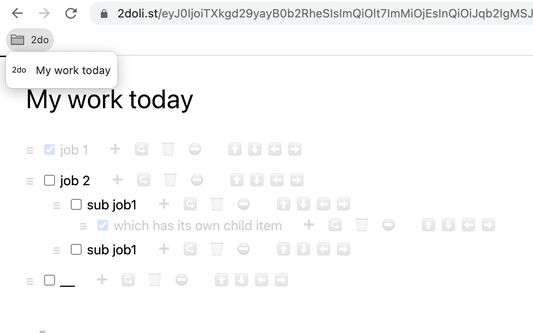
5. Click on "(Your To-Do List Title)" then edit to something else (e.g. "My today work"), then use your mouse click elsewhere
6. Then you'd see a bookmark being created under "2do" folder, named as "My today work"
7. If you wish, continue edit this To-Do list of yours, (e.g. adding more items, editing items), then updated To-Do list URL will be automatically updated to the bookmark under "2do" folder
❗IMPORTANT You must choose a unique title for each To-Do List, same title is considered same To-Do List
2. Then you navigate to the website that this extension is supporting, https://2doli.st
3. Click on "Clear All" button that the bottom-left of the webpage
4. Now you have an empty To-Do list to work on
5. Click on "(Your To-Do List Title)" then edit to something else (e.g. "My today work"), then use your mouse click elsewhere
6. Then you'd see a bookmark being created under "2do" folder, named as "My today work"
7. If you wish, continue edit this To-Do list of yours, (e.g. adding more items, editing items), then updated To-Do list URL will be automatically updated to the bookmark under "2do" folder
❗IMPORTANT You must choose a unique title for each To-Do List, same title is considered same To-Do List
评分 5(1 位用户)
权限与数据
更多信息
- 附加组件链接
- 版本
- 1.5
- 大小
- 34.7 KB
- 上次更新
- 3 年前 (2023年10月27日)
- 版本历史
- 添加到收藏集