
Export Memrise Progress 作者: neoncube
Export your Memrise community course's progress.
47 个用户47 个用户
扩展元数据
屏幕截图
关于此扩展
This extension lets you save your Memrise community course's progress, so that you can import it into another site, such as mylittlewordland.com
To download your progress:
1. Go to https://community-courses.memrise.com
2. Open a course. You should now be on the course's overview page.
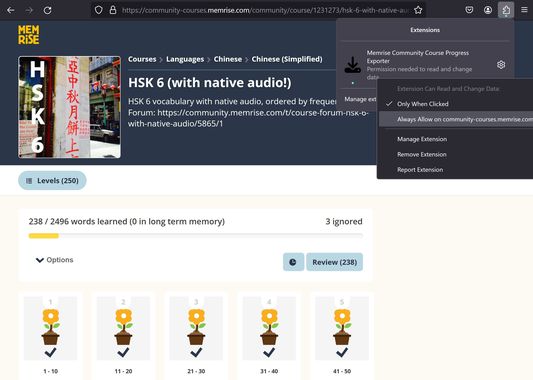
3. Click the Firefox extensions icon, right click the Memrise Community Course Progress Exporter extension, and select "Always Allow on community-courses.memrise.com" (See screenshot).
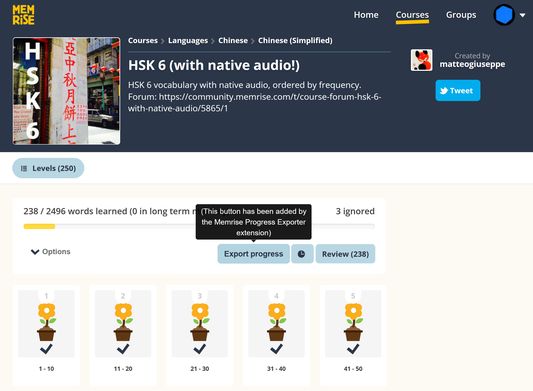
4. Click the blue "Export progress" button.
To download your progress:
1. Go to https://community-courses.memrise.com
2. Open a course. You should now be on the course's overview page.
3. Click the Firefox extensions icon, right click the Memrise Community Course Progress Exporter extension, and select "Always Allow on community-courses.memrise.com" (See screenshot).
4. Click the blue "Export progress" button.
评分 0(1 位用户)
权限与数据
必要权限:
- 访问您在 community-courses.memrise.com 的数据
- 访问您在 app.memrise.com 的数据
可选权限:
- 访问您在 community-courses.memrise.com 的数据
- 访问您在 app.memrise.com 的数据
更多信息