
Free Screenshot Tool 作者: Abro
Professional screenshot tool with full page, selection, and scrolling capture capabilities
18 个用户18 个用户
扩展元数据
屏幕截图

关于此扩展
Capture, Annotate & Share Screenshots Instantly
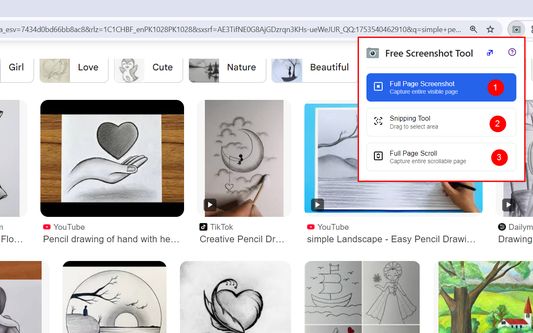
Take professional screenshots with powerful annotation tools. Select any area, draw shapes, add text, highlight content, and blur sensitive information. Features include:
Smart Selection - Click and drag to capture any screen area
Full Page Capture - Screenshot entire web pages automatically
Rich Annotations - Pen, highlighter, shapes, arrows, and text tools
Privacy Protection - Blur tool to hide sensitive content
Instant Sharing - Copy to clipboard or save directly
Clean Interface - No ads, completely free to use
Perfect for creating tutorials, bug reports, design feedback, and documentation. Works on any website with professional results every time.
No sign-up required. Start capturing better screenshots today!
Take professional screenshots with powerful annotation tools. Select any area, draw shapes, add text, highlight content, and blur sensitive information. Features include:
Smart Selection - Click and drag to capture any screen area
Full Page Capture - Screenshot entire web pages automatically
Rich Annotations - Pen, highlighter, shapes, arrows, and text tools
Privacy Protection - Blur tool to hide sensitive content
Instant Sharing - Copy to clipboard or save directly
Clean Interface - No ads, completely free to use
Perfect for creating tutorials, bug reports, design feedback, and documentation. Works on any website with professional results every time.
No sign-up required. Start capturing better screenshots today!
评分 0(1 位用户)
权限与数据
更多信息
- 版本
- 1.1
- 大小
- 658.67 KB
- 上次更新
- 1 年前 (2025年8月20日)
- 版本历史
- 添加到收藏集