Firefox 浏览器附加组件
扩展
主题
更多…
适用于 Firefox
字典和语言包
其他浏览器网站
适用于 Android 的附加组件
登录
搜索
搜索
Hide Subscribed Listing
作者:
Asjad
Hide YouTube subscribed videos by clicking on thumbnail of videos on subscription page.
实验性
实验性
3(1 条评价)
3(1 条评价)
1 个用户
1 个用户
下载 Firefox 并安装扩展
下载文件
扩展元数据
屏幕截图
关于此扩展
Hide subscribed Listing
Hide YouTube subscribed videos by clicking on thumbnail of videos on subscription page.
How to use
Download and Install Extension
Go to subscription page of YouTube web app
Wait for the page to load
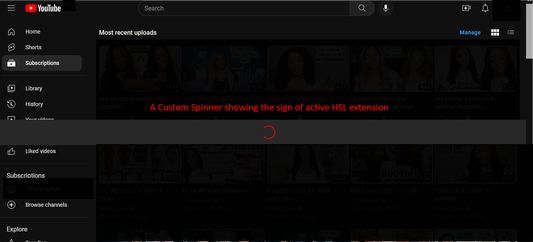
A custom spinner will appear that will do some page modification
Wait for the spinner to disappear
Click on a video's thumbnail
That video will be hidden from the subscription page
Enjoy :)
评分 3(1 位用户)
登录以评价此扩展
目前尚无评分
已保存星级评分
5
0
4
0
3
1
2
0
1
0
权限与数据
必要权限:
向您显示通知
获取浏览器标签页
访问您在 www.youtube.com 的数据
更多信息
附加组件链接
复制附加组件 ID
版本
1.32
大小
108.76 KB
上次更新
3 年前 (2023年7月31日)
相关分类
照片、音乐和视频
许可证
保留所有权利
版本历史
查看所有版本
添加到收藏集
选择一个收藏集…
创建新收藏集
举报此附加组件