
Music Guru for youtube 作者: Nebular 101
Use copyrighted music on YouTube
尚无用户尚无用户
扩展元数据
屏幕截图
关于此扩展
𝐇𝐨𝐰 𝐭𝐨 𝐮𝐬𝐞 𝐢𝐭?
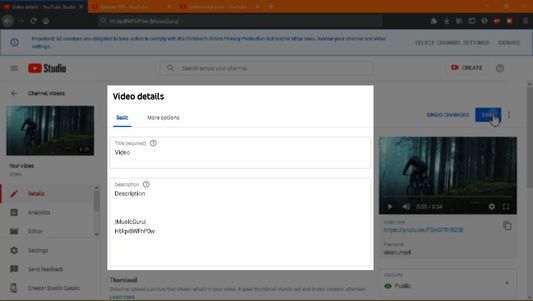
First you need to paste a code in your video description like this.
𝗬𝗼𝘂𝗿 𝘃𝗶𝗱𝗲𝗼 𝗱𝗲𝘀𝗰𝗿𝗶𝗽𝘁𝗶𝗼𝗻
|𝐌𝐮𝐬𝐢𝐜𝐆𝐮𝐫𝐮|
𝐏𝟐𝐞𝐆𝐏𝟖𝐘𝟖𝟐𝟑𝐄
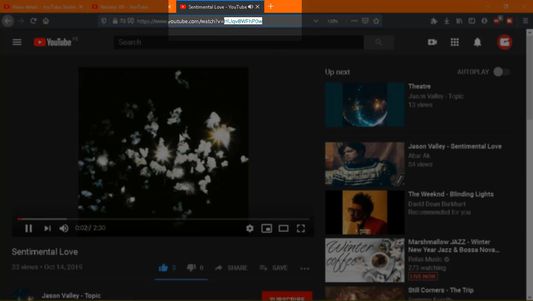
This 11 digits code is extracted from the video url you want for example
/watch?v= 𝐏𝟐𝐞𝐆𝐏𝟖𝐘𝟖𝟐𝟑𝐄
After doing this open your video in a new tab.
A text is going to appear in the autoplay this indicates that your music is loaded.
Play your video.
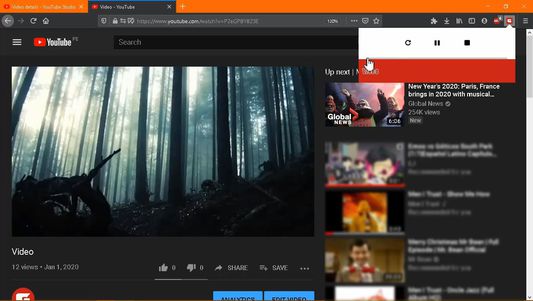
Click the addon icon.
Some buttons are going to appear.
Click the progress bar to start the audio.
𝗡𝗼𝘄 𝘁𝗵𝗲 𝗮𝘂𝗱𝗶𝗼 𝗶𝘀 𝗹𝗼𝗮𝗱𝗲𝗱 𝗮𝗻𝗱 𝘆𝗼𝘂 𝗰𝗮𝗻 𝗽𝗹𝗮𝘆 𝘆𝗼𝘂𝗿 𝘃𝗶𝗱𝗲𝗼 𝘄𝗶𝘁𝗵 𝗰𝗼𝗽𝘆𝗿𝗶𝗴𝗵𝘁 𝗺𝘂𝘀𝗶𝗰.
First you need to paste a code in your video description like this.
𝗬𝗼𝘂𝗿 𝘃𝗶𝗱𝗲𝗼 𝗱𝗲𝘀𝗰𝗿𝗶𝗽𝘁𝗶𝗼𝗻
|𝐌𝐮𝐬𝐢𝐜𝐆𝐮𝐫𝐮|
𝐏𝟐𝐞𝐆𝐏𝟖𝐘𝟖𝟐𝟑𝐄
This 11 digits code is extracted from the video url you want for example
/watch?v= 𝐏𝟐𝐞𝐆𝐏𝟖𝐘𝟖𝟐𝟑𝐄
After doing this open your video in a new tab.
A text is going to appear in the autoplay this indicates that your music is loaded.
Play your video.
Click the addon icon.
Some buttons are going to appear.
Click the progress bar to start the audio.
𝗡𝗼𝘄 𝘁𝗵𝗲 𝗮𝘂𝗱𝗶𝗼 𝗶𝘀 𝗹𝗼𝗮𝗱𝗲𝗱 𝗮𝗻𝗱 𝘆𝗼𝘂 𝗰𝗮𝗻 𝗽𝗹𝗮𝘆 𝘆𝗼𝘂𝗿 𝘃𝗶𝗱𝗲𝗼 𝘄𝗶𝘁𝗵 𝗰𝗼𝗽𝘆𝗿𝗶𝗴𝗵𝘁 𝗺𝘂𝘀𝗶𝗰.
评分 0(1 位用户)
权限与数据
更多信息