PrivateSearch 作者: Patrik
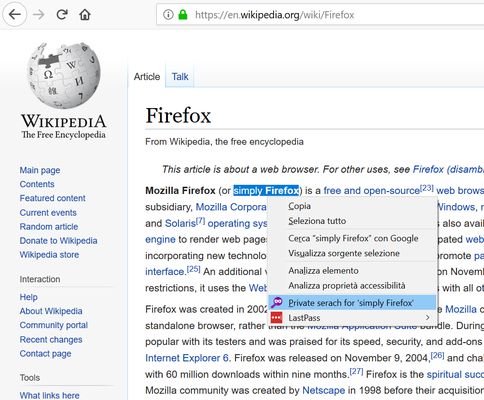
Search any text privately, with a simple right-click. The extension adds an option to the context menu to instantly open a search in a new private window, using your default search engine.
40 个用户40 个用户
扩展元数据
屏幕截图
关于此扩展
How does it work?
1. Select the text you want to search
2. Right-click on the selected text
3. Select "Private search for..."
4. A new private window will open with the search results.
No data collected, no configuration needed.
⚠️ Important
To work properly, the extension requires the "Run in Private Windows" permission. Firefox will ask you to enable it during installation; you can also do it later from the extensions settings.
1. Select the text you want to search
2. Right-click on the selected text
3. Select "Private search for..."
4. A new private window will open with the search results.
No data collected, no configuration needed.
⚠️ Important
To work properly, the extension requires the "Run in Private Windows" permission. Firefox will ask you to enable it during installation; you can also do it later from the extensions settings.
评分 5(1 位用户)
更多信息
- 附加组件链接
- 版本
- 1.2resigned1
- 大小
- 22.47 KB
- 上次更新
- 2 年前 (2024年4月26日)
- 许可证
- 保留所有权利
- 版本历史
- 添加到收藏集