SkipTo Landmarks & Headings 作者: Nicholas Hoyt
Provides keyboard access to landmark regions and headings (h1–h6) on a web page.
72 个用户72 个用户
扩展元数据
屏幕截图
关于此扩展
Overview
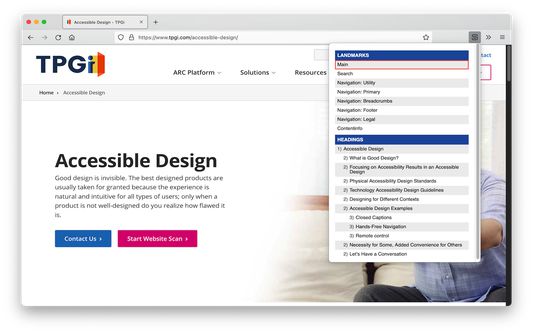
SkipTo Landmarks & Headings extends the web browser by providing a menu for easy navigation to the ARIA landmark regions and HTML section headings of a web page.
The keyboard shortcut for opening the menu is alt+2 (option+2 on Mac keyboards) and cursors keys can be used to navigate the menu.
Activating a menu item scrolls the corresponding landmark region or heading element into view and moves keyboard focus to it on the page.
Complete documentation on keyboard shortcuts, options/preferences and more is available at the SkipTo Documentation website at https://skipto.github.io/.
SkipTo Landmarks & Headings extends the web browser by providing a menu for easy navigation to the ARIA landmark regions and HTML section headings of a web page.
The keyboard shortcut for opening the menu is alt+2 (option+2 on Mac keyboards) and cursors keys can be used to navigate the menu.
Activating a menu item scrolls the corresponding landmark region or heading element into view and moves keyboard focus to it on the page.
Complete documentation on keyboard shortcuts, options/preferences and more is available at the SkipTo Documentation website at https://skipto.github.io/.
评分 5(1 位用户)
更多信息
- 附加组件链接
- 版本
- 2.2.0
- 大小
- 40.19 KB
- 上次更新
- 5 年前 (2021年10月10日)
- 相关分类
- 版本历史
- 添加到收藏集