Firefox 浏览器附加组件
  • 扩展
  • 主题
    • 适用于 Firefox
    • 字典和语言包
    • 其他浏览器网站
    • 适用于 Android 的附加组件
登录
Remote Switch for Pi-Hole 预览

Remote Switch for Pi-Hole 作者: syoder

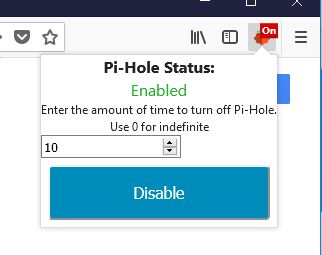
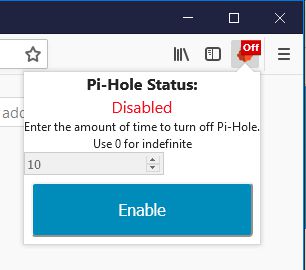
Remote Switch for Pi-Hole to enable and disable the server with the specified time provide by the user without having to open a new tab. No other installs are required

3.3(18 条评价)3.3(18 条评价)
38 个用户38 个用户
下载 Firefox 并安装扩展
下载文件

扩展元数据

屏幕截图
关于此扩展
Select the amount of time you want to disable Pi-Hole for and press Disable. When it is disabled you are enable it by the button.

IMPORTANT: In order to make this work all you have to do is get the API key from the Pi-Hole server and enter it in the option page for the add-on. It will be in form of a QR code, use a phone and convert it to text, Or use "cat /etc/pihole/setupVars.conf | grep WEBPASSWORD=" on the server. There is no install needed on the server. If you try and Disable/enable and receive an "API Error", check the API key in the option page.

This is not an official Pi-Hole application.
Pi-hole® is a registered trademark of Pi-hole LLC” or “FTLDNS™ is a trademark of Pi-hole LLC
评分 3.3(1 位用户)
登录以评价此扩展
目前尚无评分

已保存星级评分

5
9
4
0
3
2
2
1
1
6
阅读全部 18 条评价
权限与数据

必要权限:

  • 访问您在 pi.hole 的数据
详细了解
更多信息
附加组件链接
  • 用户支持网站
  • 支持邮箱
  • 复制附加组件 ID
版本
1.1resigned1
大小
24.79 KB
上次更新
2 年前 (2024年4月25日)
相关分类
  • 其他
许可证
MIT 许可证
版本历史
  • 查看所有版本
添加到收藏集
举报此附加组件
转至 Mozilla 主页

附加组件

  • 关于
  • Firefox 附加组件博客
  • 扩展工坊
  • 开发者中心
  • 开发者政策
  • 社区博客
  • 论坛
  • 报告缺陷
  • 评价指南

下载

  • Download Firefox
  • Windows
  • macOS
  • iOS
  • Android
  • Linux
  • All

最新版本

  • Nightly
  • Beta

商用版 Firefox

  • Enterprise

社区

  • Connect
  • Contribute
  • Developer

关注

  • Instagram
  • YouTube
  • TikTok
  • Bluesky
  • Podcast
  • 隐私
  • Cookie
  • 法律

除非另有注明,否则本网站上的内容可按知识共享 署名-相同方式共享 3.0 或更新版本使用。