
Table to CSV 作者: igorlogius
Export HTML tables from any web page as CSV (comma separated values)
997 个用户997 个用户
扩展元数据
屏幕截图
关于此扩展
Export HTML tables from any web page as CSV (comma separated values). The result can be copied or downloaded and opened in common spreadsheet programs such as Microsoft Excel, LibreOffice Calc or Gnumeric.
Quick start
What can be exported
When you right click, the table that contains the clicked spot is exported. If tables are nested, the innermost one under the pointer is exported, and tables inside it are not repeated in the outer one. To export the outer table, right click on a part of it that is outside the inner table. You do not have to highlight the tables first. The highlighting is only a help to find them.
The context menu entries are available on the page itself, on links, on images and in editable fields, as long as the clicked spot is inside a table.
Text content or HTML content
In both cases the result is a normal CSV file.
The export tab
CSV format
Toolbar badge and troubleshooting
Permissions and privacy
The add-on does not collect or transmit any data. The tables are processed locally in your browser.
Quick start
- Open a page that contains a table.
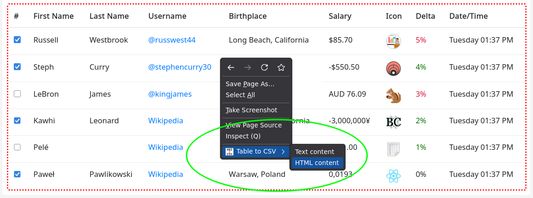
- Click the toolbar button. Every exportable element on the page gets a red dotted border. Click the button again to remove the highlighting.
- Right click inside a highlighted area to open the context menu.
- Open the submenu "Table to CSV" and choose "Text content" or "HTML content".
- A new tab opens with the CSV. Click "Copy" to copy it to the clipboard or "Download" to save it as export.csv.
What can be exported
- Regular HTML tables (the table element).
- Tables built from div elements with the CSS display values table, table-row and table-cell.
When you right click, the table that contains the clicked spot is exported. If tables are nested, the innermost one under the pointer is exported, and tables inside it are not repeated in the outer one. To export the outer table, right click on a part of it that is outside the inner table. You do not have to highlight the tables first. The highlighting is only a help to find them.
The context menu entries are available on the page itself, on links, on images and in editable fields, as long as the clicked spot is inside a table.
Text content or HTML content
- Text content: exports what you see in the cells, without markup. Repeated spaces and tabs are collapsed into one space and the text is trimmed. Line breaks inside a cell are kept.
- HTML content: exports the HTML markup inside each cell, for example links and formatting tags, exactly as it is in the page.
In both cases the result is a normal CSV file.
The export tab
- Shows the CSV in an editable text area, so you can adjust it before using it.
- Shows whether it is a Text or HTML export and how many rows were exported.
- "Copy" puts the text on the clipboard. "Download" saves a file named export.csv.
CSV format
- Fields are separated by commas and every field is wrapped in double quotes. Double quotes inside a field are doubled.
- Rows are separated by CRLF line breaks.
- Cells that span several columns (colspan) are followed by empty cells, so the columns stay aligned.
- Cells that span several rows (rowspan) leave empty cells in the rows below, so the columns stay aligned.
- Rows without cells are skipped.
- The file is UTF-8 without a byte order mark. If Excel shows special characters incorrectly when you open the file by double click, use "Data - From Text/CSV" and choose UTF-8 as the file origin.
Toolbar badge and troubleshooting
- A green check mark on the toolbar button means the add-on is ready on this page.
- A red exclamation mark means the add-on cannot access this page. Hover over the button to see the message. Firefox does not allow add-ons on pages such as about: pages, the add-on store, the built-in PDF viewer and local files.
- If the export tab says "No exportable target found", the spot you right clicked on is not inside a table. Click the toolbar button to highlight the tables on the page and right click inside one of them.
- If the export tab says it could not communicate with the page, the page is restricted or was closed in the meantime.
Permissions and privacy
- menus: adds the "Table to CSV" entries to the context menu.
- activeTab: lets the add-on read the table on the page you are currently using, only after you click the toolbar button or a menu entry.
The add-on does not collect or transmit any data. The tables are processed locally in your browser.
评分 4.1(1 位用户)
权限与数据
更多信息