Firefox 浏览器附加组件
  • 扩展
  • 主题
    • 适用于 Firefox
    • 字典和语言包
登录
Text Formatting Shortcuts for YouTube Comments 预览

Text Formatting Shortcuts for YouTube Comments 作者: Remi

Add bold, italic, and strikethrough text to YouTube comments without needing to remember what symbols to use.

5(1 条评价)5(1 条评价)
12 个用户12 个用户
下载 Firefox 并安装扩展
下载文件

扩展元数据

屏幕截图
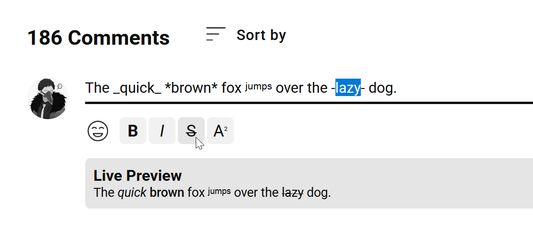
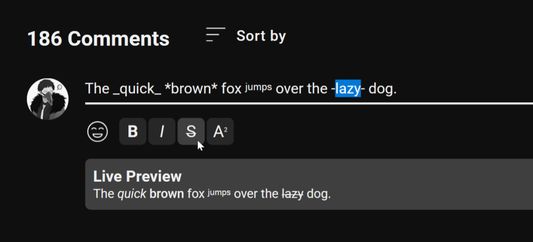
Example of what writing a YouTube comment will look like
关于此扩展
This extension creates button shortcuts for quickly applying markdown formatting to YouTube comments as you're writing them.

Features:
- Bold, italic, s̶t̶r̶i̶k̶e̶t̶h̶r̶o̶u̶g̶h̶, and ˢᵘᵖᵉʳˢᶜʳⁱᵖᵗ (may not be supported on all fonts)
- A live preview of what your comment will look like
- Dark mode support

Source code: https://github.com/Germaphobe/yt-comments-extension
评分 5(1 位用户)
登录以评价此扩展
目前尚无评分

已保存星级评分

5
1
4
0
3
0
2
0
1
0
阅读全部 1 条评价
权限与数据

必要权限:

  • 访问您用于 youtube.com 域名的网站的数据
详细了解
更多信息
附加组件链接
  • 复制附加组件 ID
版本
1.0
大小
14.35 KB
上次更新
1 年前 (2025年7月8日)
相关分类
  • 社交和通信
许可证
Mozilla 公共许可证 2.0
版本历史
  • 查看所有版本
标签
  • chat
  • social media
  • youtube
添加到收藏集
举报此附加组件
转至 Mozilla 主页

附加组件

  • 关于
  • Firefox 附加组件博客
  • 扩展工坊
  • 开发者中心
  • 开发者政策
  • 社区博客
  • 论坛
  • 报告缺陷
  • 评价指南

下载

  • Download Firefox
  • Windows
  • macOS
  • iOS
  • Android
  • Linux
  • All

最新版本

  • Nightly
  • Beta

商用版 Firefox

  • Enterprise

社区

  • Connect
  • Contribute
  • Developer

关注

  • Instagram
  • YouTube
  • TikTok
  • Bluesky
  • Podcast
  • 隐私
  • Cookie
  • 法律

除非另有注明,否则本网站上的内容可按知识共享 署名-相同方式共享 3.0 或更新版本使用。