
Live Commercial Blocker 作者: Ryan O
Automatically block TV commercials on live sports streams and play media of your choice in their place.
158 个用户158 个用户
扩展元数据
屏幕截图


关于此扩展
Live Commercial Blocker, formally titled YouTube™ Over Commercials, is an open-source Firefox add-on that works with YouTube TV, Hulu, ESPN Plus, and virtually any live TV or sports streaming service. Whether you're hosting a football watch party or casually streaming a basketball game, replace commercial breaks with content you choose.
🎓 How to Use
🎯 Key Features
Multiple Commercial Detection Modes:
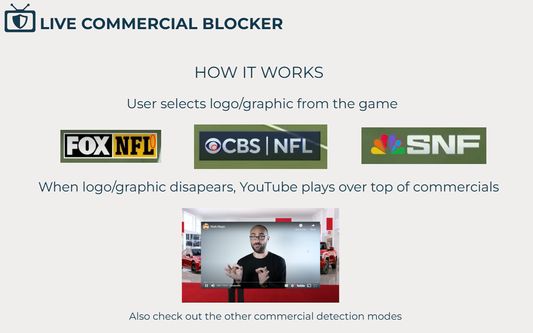
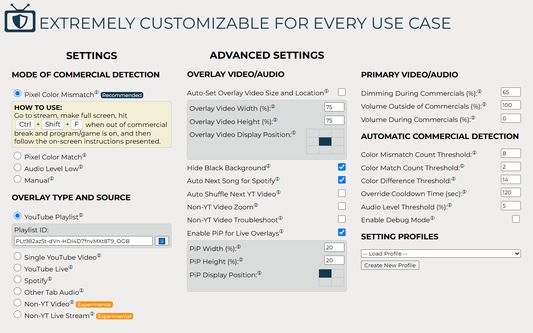
- Pixel Color Mismatch – Detects when specific on-screen graphics disappear (e.g., channel logo, score bug).
- Pixel Color Match – Detects when graphics exclusive to commercial breaks appear.
- Logo Edge Mismatch (requires additional install) – Similar to "Pixel Color Mismatch", but uses an edge profile of the logo so it works with all types of channel logos, including semi-transparent ones TV channels commonly use
- Audio Level Detection – Triggers based on sustained low volume.
- Manual (Keyboard) – Full control with keyboard shortcut.
- Manual (Double Clap 👏👏) – Control extension by clapping twice!
Flexible Media Overlay Options:
- 📺 YouTube Playlist, Single Video, or Live Stream
- 🎵 Spotify Integration – Play your favorite playlists.
- 🌐 Other Browser Tab Audio – Perfect for radio streams or dual-TV setups.
- 🎬 Non-YouTube Video & Live Streams – Use content from other websites or even local MP4 files.
Customizable Overlay Behavior:
- Picture-in-Picture (PiP) for live overlays – Fantastic for RedZone during your main NFL game.
- Choose overlay video size and screen position – Great for streams with side by side commercials.
- Auto-shuffle for YouTube playlists
- Auto-next song for Spotify
Advanced Detection Settings:
- Fine-tune pixel color thresholds
- Set mismatch and match detection counts
- Adjust audio volume and dim screen levels during commercials
Create & Manage Profiles:
- Save your full setup for different events, channels, or platforms
- Create multiple profiles with or without specific overlay IDs/URLs
- Load profiles with one click for hassle-free switching
🔒 Privacy First
This extension does not track or collect your personal data. All commercial detection happens locally on your machine.
⭐ Try It Now and Upgrade Your Streaming Experience
Get Live Commercial Blocker today and enjoy seamless, personalized media overlays every time commercials strike.
🛠 Code & Support
View the code: https://github.com/RG-O/YoutubeOverCommercials
Come join the extension discord: https://discord.gg/ccGtN2gker
Report a bug or request a new feature: https://github.com/RG-O/YoutubeOverCommercials/issues
🔧 Update Notes:
5.0
- Add ability to connect to custom plugins
4.2
- Fixed YouTube 153 error that would occur on some sites
- Made "Double Clap" mode settings more versatile
- Added slight animations to hide/show/move overlay videos
- Enhanced "Non-YT Video Zoom" mode
- Enabled more preferences to be update-able after extension is already initiated without requiring refresh
4.1
- Added new "Double Clap" manual commercial detection mode
- Renamed "Advanced Logo Analysis" commercial detection mode to "Logo Edge Mismatch"
- Added link to extension discord
4.0
- Added new "Advanced Logo Analysis" commercial detection mode (requires additional install)
- Allow user to change overlay video after extension is already running
3.2
- Fixed amazon prime video UI issue (again)
- Added local stats display to extension pop-up
3.1
- Fixed issue where amazon prime video UI would pop-up and impact pixel selection
- Added smart wait for overlay videos to load before applying various user settings
- Updated Spotify overlay mode to always display artist/song name while playing
3.0
- Rebranded from “YouTube Over Commercials” to “Live Commercial Blocker”
- Tweaks to make web Stremio app a better overlay
- Added copy id/url from current page feature
- Enhanced zoom and troubleshoot features
- Fixed issue with Other Video overlay mode
- Fixed issue with loading checkbox values from profiles
2.0
- Added Audio Level Low commercial detection mode
- Added ability to create setting profiles
- Added YouTube playlist shuffle option
- Added autoset overlay size and position feature
- General code cleanup
1.6
- Added reverse pixel commercial detection mode
- Added other video overlay zoom and troubleshooting options to work better with bootleg sites as overlay
- Removed unnecessary tabs permission
1.5
- Added picture in picture (PiP) option for live overlays
- Added auto next song as default for Spotify overlay
- General code cleanup
1.4
- Fixed issue with using extension on Amazon Prime streams
- Fixed issues with using on YouTube TV streams
1.3
- Added Other Tabs Audio overlay mode
- Minor adjustments to Spotify overlay mode
- Added live syncing of a few select preferences
- Added tooltips to help explain settings
1.2
- Added Spotify overlay mode
1.1
- Added auto commercial detection mode
- Added non-YouTube overlay modes
1.0
- Initial release with just manual commercial detection mode
⚠ Not Affiliated With YouTube, Spotify, or Any Streaming Platform
🎓 How to Use
- Set the commercial break overlay with the media of your choice in the extension settings or skip this step to use the extension's default YouTube music video playlist.
- Go to wherever you stream your sports from and play the stream in full screen.
- Click "Ctrl + Alt + C" and follow the remaining instructions presented on screen.
🎯 Key Features
Multiple Commercial Detection Modes:
- Pixel Color Mismatch – Detects when specific on-screen graphics disappear (e.g., channel logo, score bug).
- Pixel Color Match – Detects when graphics exclusive to commercial breaks appear.
- Logo Edge Mismatch (requires additional install) – Similar to "Pixel Color Mismatch", but uses an edge profile of the logo so it works with all types of channel logos, including semi-transparent ones TV channels commonly use
- Audio Level Detection – Triggers based on sustained low volume.
- Manual (Keyboard) – Full control with keyboard shortcut.
- Manual (Double Clap 👏👏) – Control extension by clapping twice!
Flexible Media Overlay Options:
- 📺 YouTube Playlist, Single Video, or Live Stream
- 🎵 Spotify Integration – Play your favorite playlists.
- 🌐 Other Browser Tab Audio – Perfect for radio streams or dual-TV setups.
- 🎬 Non-YouTube Video & Live Streams – Use content from other websites or even local MP4 files.
Customizable Overlay Behavior:
- Picture-in-Picture (PiP) for live overlays – Fantastic for RedZone during your main NFL game.
- Choose overlay video size and screen position – Great for streams with side by side commercials.
- Auto-shuffle for YouTube playlists
- Auto-next song for Spotify
Advanced Detection Settings:
- Fine-tune pixel color thresholds
- Set mismatch and match detection counts
- Adjust audio volume and dim screen levels during commercials
Create & Manage Profiles:
- Save your full setup for different events, channels, or platforms
- Create multiple profiles with or without specific overlay IDs/URLs
- Load profiles with one click for hassle-free switching
🔒 Privacy First
This extension does not track or collect your personal data. All commercial detection happens locally on your machine.
⭐ Try It Now and Upgrade Your Streaming Experience
Get Live Commercial Blocker today and enjoy seamless, personalized media overlays every time commercials strike.
🛠 Code & Support
View the code: https://github.com/RG-O/YoutubeOverCommercials
Come join the extension discord: https://discord.gg/ccGtN2gker
Report a bug or request a new feature: https://github.com/RG-O/YoutubeOverCommercials/issues
🔧 Update Notes:
5.0
- Add ability to connect to custom plugins
4.2
- Fixed YouTube 153 error that would occur on some sites
- Made "Double Clap" mode settings more versatile
- Added slight animations to hide/show/move overlay videos
- Enhanced "Non-YT Video Zoom" mode
- Enabled more preferences to be update-able after extension is already initiated without requiring refresh
4.1
- Added new "Double Clap" manual commercial detection mode
- Renamed "Advanced Logo Analysis" commercial detection mode to "Logo Edge Mismatch"
- Added link to extension discord
4.0
- Added new "Advanced Logo Analysis" commercial detection mode (requires additional install)
- Allow user to change overlay video after extension is already running
3.2
- Fixed amazon prime video UI issue (again)
- Added local stats display to extension pop-up
3.1
- Fixed issue where amazon prime video UI would pop-up and impact pixel selection
- Added smart wait for overlay videos to load before applying various user settings
- Updated Spotify overlay mode to always display artist/song name while playing
3.0
- Rebranded from “YouTube Over Commercials” to “Live Commercial Blocker”
- Tweaks to make web Stremio app a better overlay
- Added copy id/url from current page feature
- Enhanced zoom and troubleshoot features
- Fixed issue with Other Video overlay mode
- Fixed issue with loading checkbox values from profiles
2.0
- Added Audio Level Low commercial detection mode
- Added ability to create setting profiles
- Added YouTube playlist shuffle option
- Added autoset overlay size and position feature
- General code cleanup
1.6
- Added reverse pixel commercial detection mode
- Added other video overlay zoom and troubleshooting options to work better with bootleg sites as overlay
- Removed unnecessary tabs permission
1.5
- Added picture in picture (PiP) option for live overlays
- Added auto next song as default for Spotify overlay
- General code cleanup
1.4
- Fixed issue with using extension on Amazon Prime streams
- Fixed issues with using on YouTube TV streams
1.3
- Added Other Tabs Audio overlay mode
- Minor adjustments to Spotify overlay mode
- Added live syncing of a few select preferences
- Added tooltips to help explain settings
1.2
- Added Spotify overlay mode
1.1
- Added auto commercial detection mode
- Added non-YouTube overlay modes
1.0
- Initial release with just manual commercial detection mode
⚠ Not Affiliated With YouTube, Spotify, or Any Streaming Platform
评分 4(1 位用户)
权限与数据
更多信息